
Managing Google Customer Reviews
Google customer review management is accessible from the main Vocaza Journey menu, under the Reviews Management section.
This area allows you to centralize, view, and process all your Google customer reviews for one or multiple sites/locations, helping you monitor your online reputation and interact effectively with your customers.
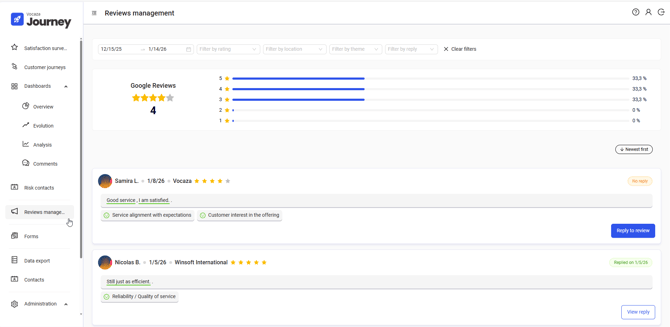
Display Filters
Filters allow you to refine the display by:
-
Period (by default, the last 30 days);
-
Rating given;
-
Themes detected in the review content;
-
Sites, in the case of multi-site management;
-
Response status: reviews with or without a response from you.
Review Monitoring Indicators
At the top of the screen, several indicators provide a global view of your online reputation:
-
Overall rating: average of all collected ratings;
-
Rating distribution (%): visualization of the percentage of reviews by rating level (from 1 to 5 stars).
Customer Review List
The list displays all collected reviews, including:
-
Reviewer information;
-
Publication or last update date by the contributor;
-
Associated site, in the case of multi-site management;
-
Rating given;
-
Review content, categorized by the semantic analysis engine;
-
Processing status (responded on… / not responded).
Semantic Analysis of Customer Reviews
Textual review comments are automatically analyzed by Vocaza Journey’s semantic analysis engine, based on the analysis plan defined during setup (link to the relevant page).
This analysis makes it possible to identify key themes and their associated sentiment as expressed by customers.
Analysis Plans by Site
Each site can have its own analysis plan to reflect its specific characteristics (offering, organization, local context).
When multiple sites share the same activity, it is recommended to use a common analysis plan to ensure consistent and comparable interpretation of results.
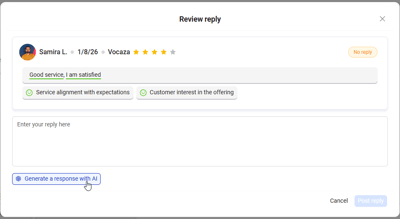
Responding to Customer Reviews
From each review, you can:
-
Write a response manually;
-
Generate a response using AI to save time while maintaining consistent communication;
-
Rephrase an existing response using AI to ensure tone and consistency.
💡 Configuration of AI-generated responses and rephrasing is centralized in Administration > Settings and is reserved for users with the Administrator role.