
To change a user's role or, if they are a consultant, to adjust their visibility rights on projects and interactions, you need to access their profile. Here’s how:
- Go to the user management page.
- Click on the name of the user you wish to modify.
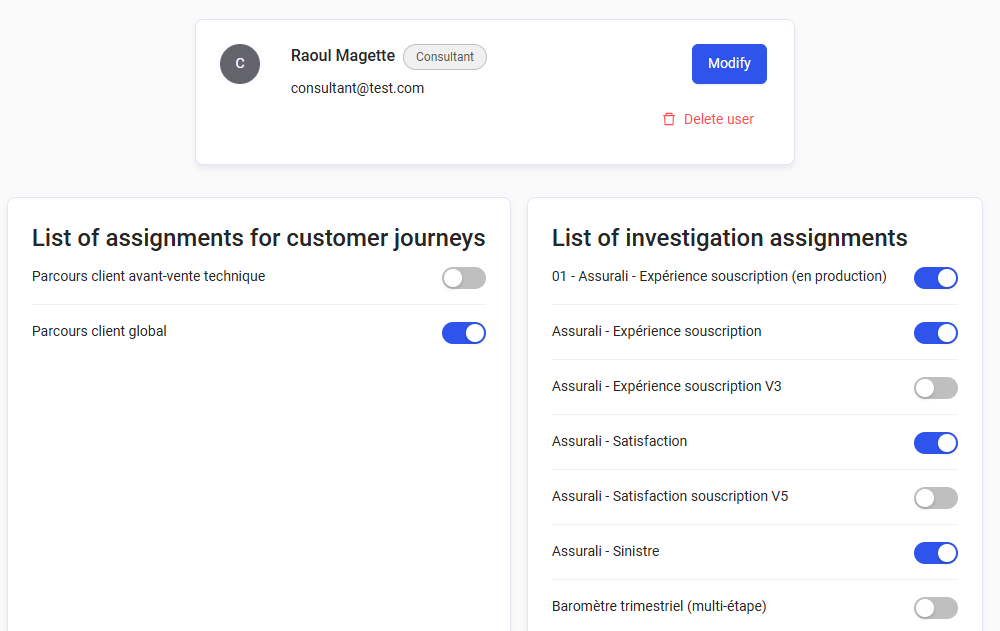
- If you want to change:
- The user’s name, surname, email address, or profile 👉 click the "Edit" button.
- For a consultant, their visibility rights on surveys 👉 check/uncheck the desired surveys.
-
For a consultant, their visibility rights on customer journeys 👉 you need to check/uncheck the desired customer journeys.
👉 When a consultant has access to a customer journey, they can only view the surveys within that journey for which they already have visibility rights.
Please note that only users with the Consultant role have restrictions on projects/interactions. Expert users have access rights to all surveys and forms.