
Creating a customer journey is done from the Customer Journeys page by following these steps:
-
Click Create a Customer Journey.
-
In the window that opens:
-
Enter the name of your customer journey;
-
Select the satisfaction surveys you want to include in the journey (you can add one or more).
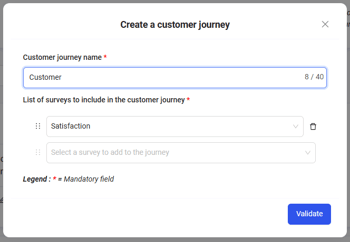
-
-
Confirm to save your journey.
💡 Customer journeys allow you to group multiple satisfaction surveys to track your customers’ overall experience across different stages or services.